TrendFollow
TrendFollow trades trend-continuation setups using a trailing stop line and
deterministic entry filters.
Visual overview
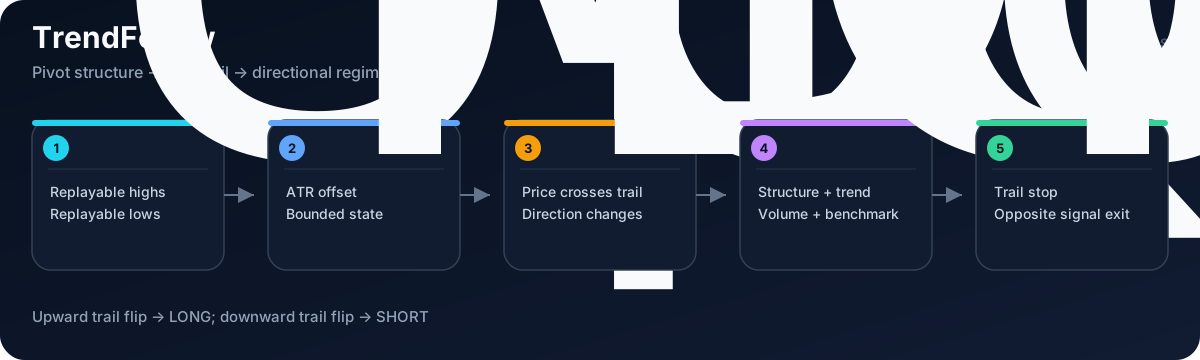
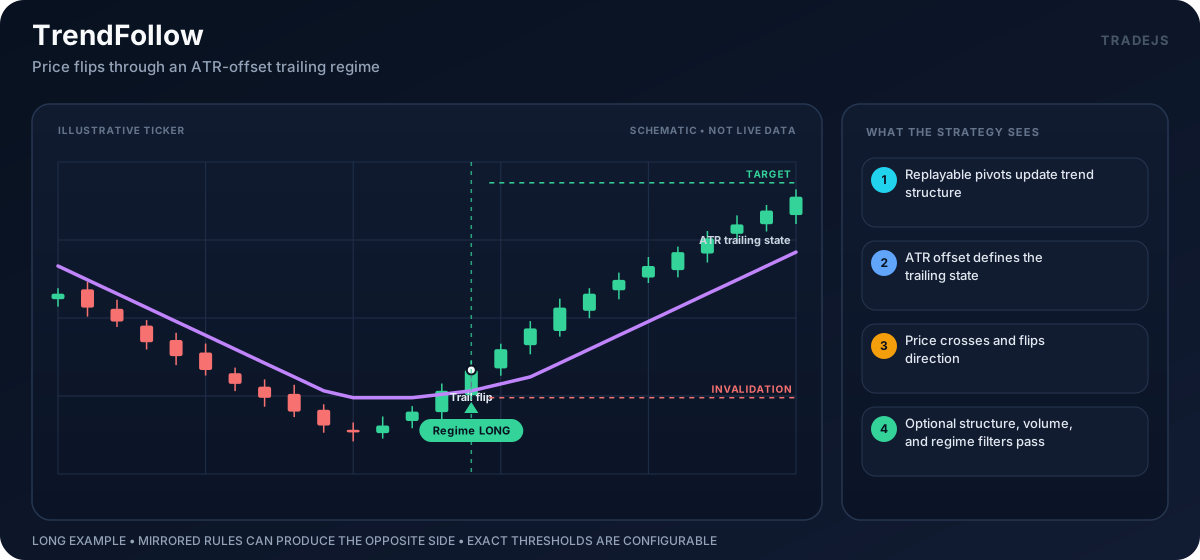
The illustrations are schematic, not market data. Exact thresholds, confirmation rules, and risk parameters come from the active strategy config.
Entry Logic
- Replays candles through
createTrendFollowEngine(...). - Reads
runtimeState.signalandruntimeState.snapshot. - Skips until a bullish or bearish trend signal exists.
- Selects
LONGorSHORTside config from signal direction. - Uses
signal.trailStopas the stop-loss reference. - Computes target from
TRENDFOLLOW_TARGET_R_MULT. - Sizes quantity from
MAX_LOSS_VALUE / riskDistance, using theRISK_FEE_RATE,RISK_SLIPPAGE_BPS, andRISK_MARKET_IMPACT_BPSestimates. - Returns
entrywith trend-follow figures andtrendFollowContext.
Entry codes:
TRENDFOLLOW_BULL_TRENDTRENDFOLLOW_BEAR_TREND
Exits
When a position exists:
TRENDFOLLOW_TRAIL_STOP_EXITwhenTRENDFOLLOW_EXIT_ON_TRAIL_STOP=trueand price crosses the active trailing stop.TRENDFOLLOW_OPPOSITE_SIGNAL_EXITwhenTRENDFOLLOW_EXIT_ON_OPPOSITE_SIGNAL=trueand the engine emits an opposite trend signal.- otherwise
POSITION_EXISTS.
Configuration keys
The keys are grouped by purpose. A listed _LONG or _SHORT key overrides
the unsuffixed value for that direction.
| Group | Keys | Purpose |
|---|---|---|
| Runtime and decision services | ENV, INTERVAL, MAKE_ORDERS, CLOSE_OPPOSITE_POSITIONS, BACKTEST_PRICE_MODE, AI_ENABLED, AI_MODE, MIN_AI_QUALITY, ML_ENABLED, ML_THRESHOLD | Select the runtime mode and candle interval, control order placement, and enable optional AI or ML decisions. |
| Shared indicators | MA_FAST, MA_MEDIUM, MA_SLOW, OBV_SMA, ATR, ATR_PCT_SHORT, ATR_PCT_LONG, BB, BB_STD, MACD_FAST, MACD_SLOW, MACD_SIGNAL | Set the periods used to build shared market context and signal filters. |
| Trend line | TRENDFOLLOW_PIVOT_LENGTH, TRENDFOLLOW_ATR_LENGTH, TRENDFOLLOW_ATR_MULT, TRENDFOLLOW_SIGNAL_OFFSET_ATR, TRENDFOLLOW_MIN_BARS_BETWEEN_SIGNALS | Define confirmed pivots, trailing-line ATR scale, signal offset, and signal cooldown. |
| Entry structure | TRENDFOLLOW_REQUIRE_STRUCTURE_BREAKOUT, TRENDFOLLOW_REQUIRE_TREND_ALIGNMENT, TRENDFOLLOW_REQUIRE_BENCHMARK_ALIGNMENT, TRENDFOLLOW_MIN_STRUCTURE_ACCEPTANCE_CLOSES, TRENDFOLLOW_MIN_BREAKOUT_BODY_ATR, TRENDFOLLOW_MIN_BREAKOUT_DISTANCE_PCT, TRENDFOLLOW_MIN_BREAKOUT_DISTANCE_PCT_LONG, TRENDFOLLOW_MIN_BREAKOUT_DISTANCE_PCT_SHORT, TRENDFOLLOW_MAX_BREAKOUT_DISTANCE_PCT | Require a confirmed structure break and trend or benchmark agreement inside the configured breakout distance. |
| Participation and regime | TRENDFOLLOW_MIN_VOLUME_REL20, TRENDFOLLOW_MIN_TREND_PERSISTENCE, TRENDFOLLOW_MIN_TREND_PERSISTENCE_LONG, TRENDFOLLOW_MIN_TREND_PERSISTENCE_SHORT, TRENDFOLLOW_MAX_RSI, TRENDFOLLOW_MAX_RSI_LONG, TRENDFOLLOW_MAX_RSI_SHORT, TRENDFOLLOW_MAX_BB_WIDTH_PCT, TRENDFOLLOW_MAX_BB_WIDTH_PCT_LONG, TRENDFOLLOW_MAX_BB_WIDTH_PCT_SHORT | Set volume, trend-persistence, RSI, and Bollinger-width filters, with directional overrides. |
| Target and exits | TRENDFOLLOW_TARGET_R_MULT, TRENDFOLLOW_TARGET_R_MULT_LONG, TRENDFOLLOW_TARGET_R_MULT_SHORT, TRENDFOLLOW_EXIT_ON_TRAIL_STOP, TRENDFOLLOW_EXIT_ON_OPPOSITE_SIGNAL | Set directional target distance and enable trailing-stop or opposite-signal exits. |
| Figures and side policy | TRENDFOLLOW_MAX_FIGURE_POINTS, MAX_LOSS_VALUE, LONG.*, SHORT.* | Limit chart output, set the loss budget, and configure each direction. |
Signal Payload
The strategy stores:
additionalIndicators.trendFollowContext- trend and trailing-stop figures from
buildTrendFollowFigures(...) - stop at
signal.trailStop - one take-profit at the computed target
Common Skip Reasons
NO_TREND_FOLLOW_SIGNALPOSITION_EXISTSDEV_TRADE_COOLDOWNSTRATEGY_DISABLEDINVALID_STOPINVALID_QTYRISK_RATIO:<value>
Validation Notes
Trend-following experiments are very sensitive to stop distance, warmup length, and market regime. Treat guardrail behavior as implementation detail to validate with your own tickers and timeframes.
Related: